
How to make a visual schedule
To make a visual schedule, pick one routine, choose a picture or photo for each of its three to five steps, put the steps in order and print the PDF. Laminate it, add Velcro dots and hang it where the routine happens. Prefer not to build one? Use the free visual schedule printables instead.
- Start from a template, such as Morning routine, Toilet, Bedtime or School day, or clear the steps and give the schedule your own title.
- Add one step for each part of the routine, three to five for a young child, and pick a picture for each step or use your own photo of the real thing.
- Put the steps in order. Choose top to bottom for a wall or a door, or left to right for a desk strip, and number the steps if that helps your child.
- Pick US Letter or A4, and turn on the page of cut-out cards if your child will move each card to a “done” pocket.
- Download the PDF or PNG, print it, laminate the schedule and the cards, and put Velcro dots on both.
- Hang the schedule where the routine happens, point to each picture before the step, and help a little less each week.
What is a visual schedule?
A visual schedule is a row of pictures that shows the steps of a routine, or the parts of a day, in order. A visual schedule lets a child see what is happening now, what comes next and when it ends. In UK and Australian schools the same support is usually called a visual timetable.
Spoken directions are gone the moment you say them. A picture stays on the wall. For many young autistic children, transitions are the hard part of the day: stopping one thing and starting another, or not knowing how long something will last. A schedule answers "what now?" before the question turns into a meltdown. Visual supports are one of the evidence-based practices for autistic children in the 2020 review by the National Clearinghouse on Autism Evidence and Practice.
Following a schedule builds on two skills you can practice on their own: putting pictures in order, with the free sequencing activities, and finishing everyday routines such as toileting and handwashing, which the AFLS assessment breaks down step by step.
How do you use a visual schedule with a young child?
Use a visual schedule by starting smaller than you think: one routine that happens every day, with three to five steps. Point to each picture before the step, say one or two words, do the step together and let your child move the card to "done". One routine done daily teaches more than a full-day schedule your child ignores.
- Pick one routine, such as using the toilet, brushing teeth or getting ready to leave the house. The builder has templates for these.
- Hang the schedule where the routine happens: the bathroom mirror, the front door, the bedroom wall.
- Before each step, point to the picture and say one or two words: "Wash hands." Then do the step together.
- When a step is done, your child takes the card off and puts it in a "done" pocket, or turns it over. Print the page of cut-out cards for this.
- Help less over time. Point instead of saying the word, then wait and let your child check the schedule on their own.
- If your child does not yet recognize drawings, use photos of the real things: your toilet, their toothbrush, their school door.
- When the day will not go to plan, such as a new teacher or a doctor’s visit, prepare your child with a free social story as well as the schedule.
Top to bottom or left to right?
A top-to-bottom visual schedule fits a wall, a door or the fridge, and works well for routines with more steps. A left-to-right strip fits on a table or a desk, and suits a short sequence your child does in one place. Choose the layout by where the schedule will hang, then keep it the same.
If two pictures are already a lot for your child, start with the first-then board maker instead: one picture for what happens first, one for what comes right after. When that is easy, move to a three-step schedule.
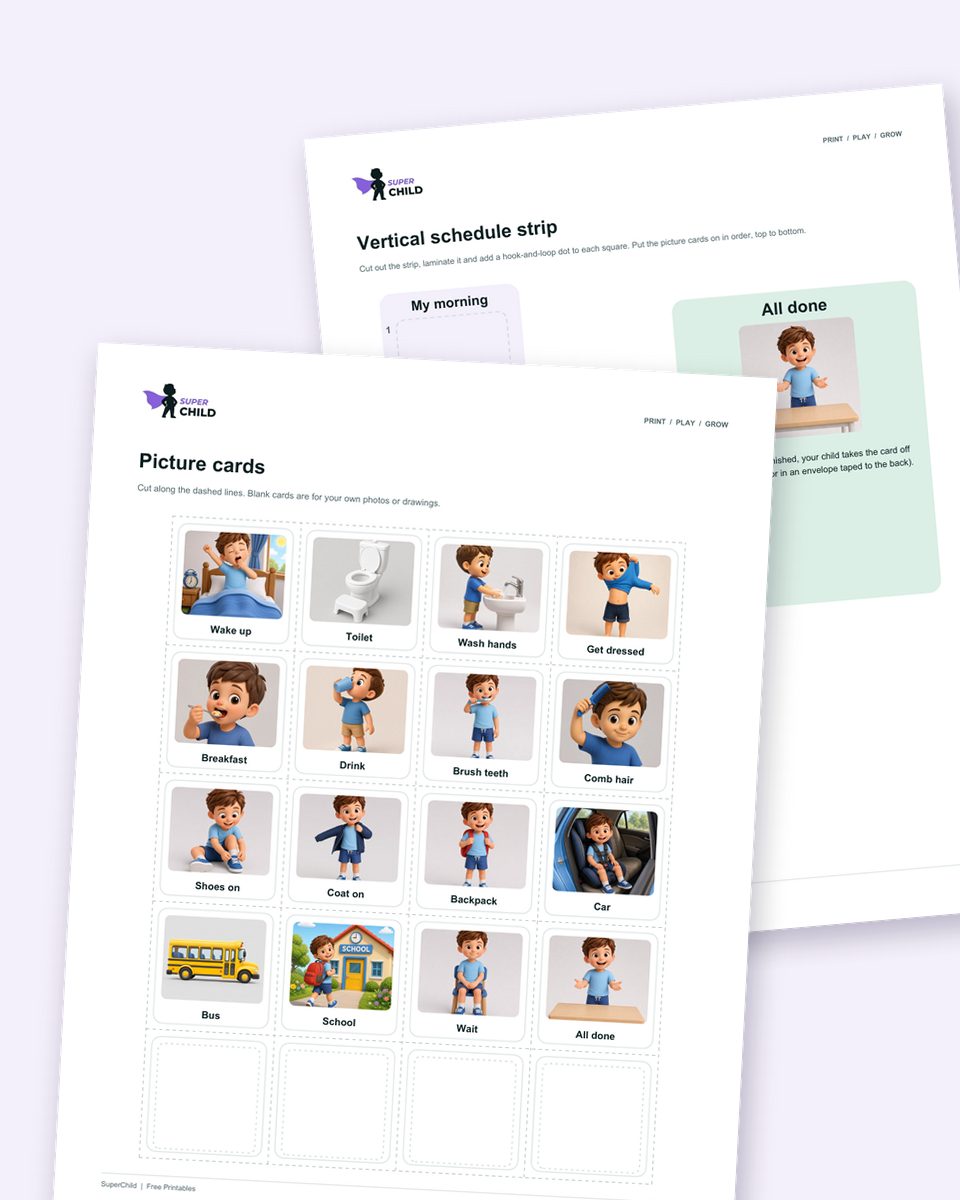
Free download3 PDFs
Get the free visual schedule pack
Morning and bedtime routines plus picture cards for the whole day, with strips, a parent guide and a log.
Cite this page
Citation (APA style)
SuperChild. (2026). Free visual schedule maker for autism. Retrieved from https://superchild.ai/free-tools/visual-schedule-maker
Link for your website
<a href="https://superchild.ai/free-tools/visual-schedule-maker">Free visual schedule maker for autism</a> (SuperChild)